
2023.02.23 - [Java/spring 게시판] - spring boot 게시판 - 11 <게시물 검색 페이징 처리>
spring boot 게시판 - 11 <게시물 검색 페이징 처리>
2023.02.21 - [Java/spring 게시판] - spring boot 게시판 - 10 spring boot 게시판 - 10 2022.11.30 - [Java/spring 게시판] - spring boot 게시판 - 9 spring boot 게시판 - 9 2022.11.30 - [Java/spring 게시판] - spring boot 게시판 - 8 spring
magicmk.tistory.com
나태지옥에서 빠져나오겠다고 선언한 지 언 4개월이 흘러흘러... 다행히 자격증은 끝이 났고 이번에는
일본어 공부에 푹 빠져서 일본인들과 대화하며 어울리느라 시간을 보냈다.. (뭐 이것저것 공부하고 경험했으니 된건가?...)
아무튼 오랜 기간 놔뒀던 댓글 기능을 구현해 보자..
✅ Table 작성
비즈니스 로직을 구현하기 이전에 Comment Entity를 만든다.
⏹️ Comment.java
@Entity
@Getter
@Builder
@AllArgsConstructor
@NoArgsConstructor
@Table(name = "comment")
public class Comment extends BaseEntity {

    @Id
    @GeneratedValue(strategy = GenerationType.IDENTITY)
    private Long id;

    @Column(nullable = false)
    private String content;

    @ManyToOne
    @JoinColumn(name = "BOARD_ID")
    private Board board;

    @ManyToOne
    @JoinColumn(name = "MEMBER_ID")
    private Member member;

    public void update(String content) {
        this.content = content;
    }
}
기본적으로 댓글 내용과 어느 게시물의 댓글인지, 누구의 댓글인지를 알기 위해 board, member를 넣었다.
✅ 비즈니스 로직
이제 댓글 작성, 수정, 삭제, 조회 기능을 구현한다.
🟧 Controller
⏹️ CommentController.java
@Controller
@RequiredArgsConstructor
public class CommentController {

    private final CommentService commentService;

    /**
     * 댓글 작성
     * @param id 게시물
     * @param commentRequestDTO 댓글 정보
     * @param authentication 유저 정보
     * @return 게시물 상세 페이지
     */
    @PostMapping("/board/{id}/comment")
    public String writeComment(@PathVariable Long id, CommentRequestDTO commentRequestDTO, Authentication authentication) {
        UserDetails userDetails = (UserDetails) authentication.getPrincipal();
        commentService.writeComment(commentRequestDTO, id, userDetails.getUsername());

        return "redirect:/board/" + id;
    }

    /**
     * 댓글 수정
     * @param id 게시물
     * @param commentId 댓글 ID
     * @param commentRequestDTO 댓글 정보
     * @return 게시물 상세 페이지
     */
    @ResponseBody
    @PostMapping("/board/{id}/comment/{commentId}/update")
    public String updateComment(@PathVariable Long id, @PathVariable Long commentId, CommentRequestDTO commentRequestDTO) {
        commentService.updateComment(commentRequestDTO, commentId);
        return "/board/" + id;
    }

    /**
     * 댓글 삭제
     * @param id 게시물
     * @param commentId 댓글 ID
     * @return 해당 게시물 리다이렉트
     */
    @GetMapping("/board/{id}/comment/{commentId}/remove")
    public String deleteComment(@PathVariable Long id, @PathVariable Long commentId) {
        commentService.deleteComment(commentId);
        return "redirect:/board/" + id;
    }
}
🟧 Service
⏹️ CommentService.java
public interface CommentService {

    /**
     * 댓글 작성
     * @param commentRequestDTO 댓글 정보
     * @param boardId 게시물
     * @param email 작성자
     * @return 댓글 ID
     */
    Long writeComment(CommentRequestDTO commentRequestDTO, Long boardId, String email);

    /**
     * 댓글 조회
     * @param id 게시물
     * @return 게시물 별 댓글
     */
    List<CommentResponseDTO> commentList(Long id);

    /**
     * 댓글 수정
     * @param commentRequestDTO 댓글 정보
     * @param commentId 댓글 ID
     */
    void updateComment(CommentRequestDTO commentRequestDTO, Long commentId);

    /**
     * 댓글 삭제
     * @param commentId 댓글 ID
     */
    void deleteComment(Long commentId);
}
⏹️ CommentServiceImpl.java
@Service
@RequiredArgsConstructor
public class CommentServiceImpl implements CommentService{

    private final MemberRepository memberRepository;
    private final BoardRepository boardRepository;
    private final CommentRepository commentRepository;

    @Override
    public Long writeComment(CommentRequestDTO commentRequestDTO, Long boardId, String email) {
        Member member = memberRepository.findByEmail(email).orElseThrow(() -> new UsernameNotFoundException("이메일이 존재하지 않습니다."));
        Board board = boardRepository.findById(boardId).orElseThrow(() -> new IllegalArgumentException("게시물을 찾을 수 없습니다."));
        Comment result = Comment.builder()
                .content(commentRequestDTO.getContent())
                .board(board)
                .member(member)
                .build();
        commentRepository.save(result);

        return result.getId();
    }

    @Override
    public List<CommentResponseDTO> commentList(Long id) {
        Board board = boardRepository.findById(id).orElseThrow(() -> new IllegalArgumentException("게시물을 찾을 수 없습니다."));
        List<Comment> comments = commentRepository.findByBoard(board);

        return comments.stream()
                .map(comment -> CommentResponseDTO.builder()
                        .comment(comment)
                        .build())
                .collect(Collectors.toList());
    }

    @Override
    public void updateComment(CommentRequestDTO commentRequestDTO, Long commentId) {
        Comment comment = commentRepository.findById(commentId).orElseThrow(() -> new IllegalArgumentException("존재하지 않는 댓글입니다."));
        comment.update(commentRequestDTO.getContent());
        commentRepository.save(comment);
    }

    @Override
    public void deleteComment(Long commentId) {
        commentRepository.deleteById(commentId);
    }
}
🟧 Repository
⏹️ CommentRepository.java
public interface CommentRepository extends JpaRepository<Comment, Long> {

    List<Comment> findByBoard(Board board);
}
🟧 View
⏹️ detail.html
<!-- Comments Form -->
<div class="card my-4">
    <h5 class="card-header">Leave a Comment:</h5>
    <div class="card-body">
        <form th:action="@{/board/{id}/comment(id=${id})}" th:method="post">
            <div class="form-group" style="margin-bottom: 10px;">
                <input type="hidden" name="idx" th:value="*{idx}" />
                <textarea name="content" class="form-control" rows="3"></textarea>
            </div>
            <button type="submit" class="btn btn-primary">Submit</button>
        </form>
    </div>
</div>

<!-- Display Comments -->
<div class="card my-4" th:if="${comments.size()} != 0">
    <h5 class="card-header">Comments:</h5>
    <div class="card-body">
        <div th:each="comment : ${comments}">
            <div class="media mb-4">
                <div class="media-body">
                    <h5 class="mt-0" th:text="${comment.getUsername()}">User Name</h5>
                    <p th:text="${comment.getContent()}" th:id="'comment-' + ${comment.getId()}">Comment content</p>
                    <small class="text-muted" th:text="${#temporals.format(comment.getCreatedAt(), 'yyyy-MM-dd HH:mm')}">Comment Date</small>
                    <div th:if="${comment.getEmail() == #authentication.principal.username}">
                        <button class="btn btn-sm btn-outline-warning" th:attr="data-id=${comment.getId()}" onclick="editComment(this)">Edit</button>
                        <a th:href="@{/board/{id}/comment/{commentId}/remove(id=${id}, commentId=${comment.getId()})}" class="btn btn-sm btn-outline-danger" onclick="return confirm('Delete this comment?')">Delete</a>
                    </div>
                </div>
            </div>
        </div>
    </div>
</div>
기존에 존재하던 detail.html에 댓글을 입력하는 창과 수정 및 삭제를 할 수 있도록 구현했다.
⏹️ comment.js
function editComment(button) {
    const commentId = button.getAttribute('data-id');
    const commentElement = document.getElementById('comment-' + commentId);
    const commentContent = commentElement.textContent;

    const newContent = prompt('Edit your comment:', commentContent);
    if (newContent) {
        $.post(`/board/${id}/comment/${commentId}/update`, {content: newContent}, function(data) {
            window.location.href = data;
        });
    }
}
수정 버튼을 눌렀을 때 수정할 수 있는 alert이 뜰 수 있도록 구현했다.
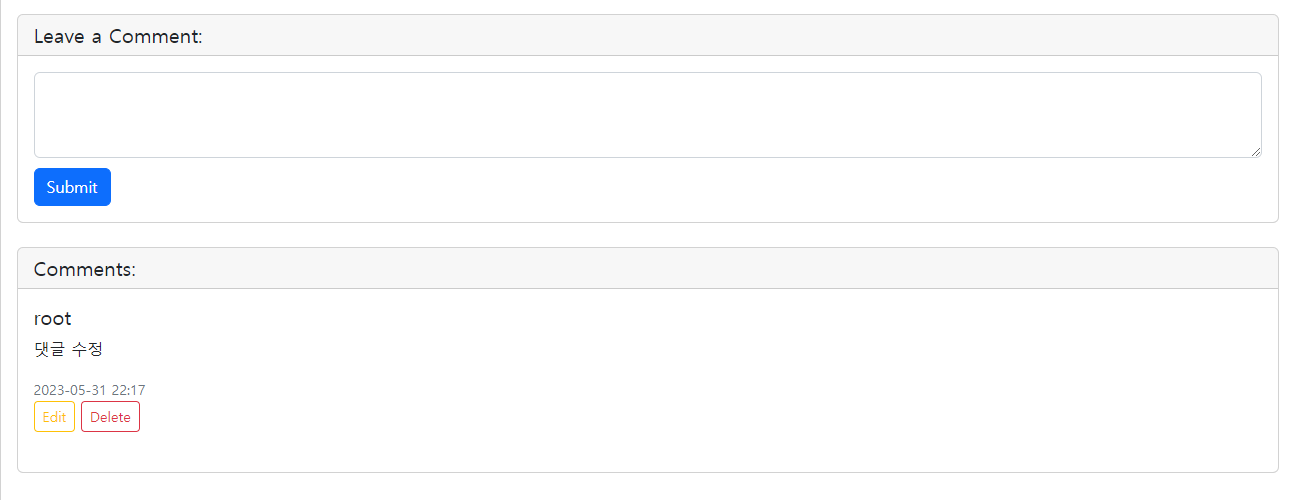
이런 식으로 댓글을 작성하고 수정 및 삭제가 가능하도록 구현하였다.
✅ 끝
게시물 CRUD, 회원 CRUD를 진행하다 보니 같은 로직의 반복이라 딱히 블로그에 정리할만한 게 없는 것 같다.
그래도 다음에 시도하려고 하는 것은 프로필 이미지니까 조금 재밌게 할 수 있지 않을까 싶다.
그럼 이번에 만든 댓글에도 프로필 이미지가 나와야겠지... 또 수정... 하...
https://github.com/Kimmingki/board
GitHub - Kimmingki/board: 강의만 듣다 때려치우지 말고 조금씩이라도 개발해보자...!!
강의만 듣다 때려치우지 말고 조금씩이라도 개발해보자...!! Contribute to Kimmingki/board development by creating an account on GitHub.
github.com
'Java > Spring Boot 게시판' 카테고리의 다른 글
| spring boot 게시판 - 14 <게시물 이미지 기능> (9) | 2023.06.19 |
|---|---|
| spring boot 게시판 - 13 <프로필 사진 구현> (8) | 2023.06.16 |
| spring boot 게시판 - 11 <게시물 검색 페이징 처리> (2) | 2023.02.23 |
| spring boot 게시판 - 10 <JPA Pageable, thymeleaf> (0) | 2023.02.21 |
| spring boot 게시판 - 9 <게시물 수정, 삭제> (2) | 2022.11.30 |