spring boot 게시판 - 11 <게시물 검색 페이징 처리>
2023.02.21 - [Java/spring 게시판] - spring boot 게시판 - 10
spring boot 게시판 - 10 <JPA Pageable, thymeleaf>
2022.11.30 - [Java/spring 게시판] - spring boot 게시판 - 9 spring boot 게시판 - 9 2022.11.30 - [Java/spring 게시판] - spring boot 게시판 - 8 spring boot 게시판 - 8 2022.11.24 - [Java/spring 게시판] - spring boot 게시판 - 7 spring bo
magicmk.tistory.com
퇴근하고 나태지옥에서 빠져나와서 2시간은 족히 걸릴 각오하고 시작했던
게시물 검색 기능은 2시간이 아니라 2분 컷이었다.
....
그럴 리 없지 오류는 늘 예상치 못한 곳에서 튀어나온다.
✅ 게시물 검색
검색은 기존 Home 화면에서 keyword만 인자로 추가하여 새로운 boardList를 받는 형식으로 구현했다.
🟧 Controller
⏹️ GlobalController.java
/**
 * Home 화면
 * @return 홈 페이지
 */
@GetMapping("/")
public String home(Model model, @PageableDefault(page = 0, size = 10, sort = "id", direction = Sort.Direction.DESC)Pageable pageable) {
    model.addAttribute("boardList", boardService.boardList(pageable));

    return "home";
}
기존 코드
⏹️ GlobalController.java
/**
 * Home 화면
 * @return 홈 페이지
 */
@GetMapping("/")
public String home(Model model, @PageableDefault(page = 0, size = 10, sort = "id", direction = Sort.Direction.DESC)Pageable pageable, String keyword) {
    if(keyword == null) {
        model.addAttribute("boardList", boardService.boardList(pageable));
    } else {
        model.addAttribute("boardList", boardService.searchingBoardList(keyword, pageable));
    }

    return "home";
}
변경 코드
인자로 keyword 값을 전달받고 keyword가 존재하면 다른 boardList를 받을 수 있도록
분기처리 하였다.
🟧 Service
⏹️ BoardService.java
/**
 * 게시글 검색
 * @param keyword 검색어
 * @param pageable 페이징 처리
 * @return 검색 된 게시글 목록 (페이징)
 */
Page<BoardResponseDTO> searchingBoardList(String keyword, Pageable pageable);
⏹️ BoardServiceImpl.java
@Override
public Page<BoardResponseDTO> searchingBoardList(String keyword, Pageable pageable) {
    Page<Board> boards = boardRepository.findByTitle(keyword, pageable);
    return getBoardResponseDTOS(pageable, boards);
}

private Page<BoardResponseDTO> getBoardResponseDTOS(Pageable pageable, Page<Board> boards) {
    List<BoardResponseDTO> boardDTOs = new ArrayList<>();

    for (Board board : boards) {
        BoardResponseDTO result = BoardResponseDTO.builder()
                .board(board)
                .build();
        boardDTOs.add(result);
    }

    return new PageImpl<>(boardDTOs, pageable, boards.getTotalElements());
}
이전 게시글인 페이징 처리에서 사용한 로직에 중복이 있어서 위와 같이 메서드화 시켜 진행하였다.
🟧 Repository
⏹️ BoardRepository.java
public interface BoardRepository extends JpaRepository<Board, Long> {

    Page<Board> findByTitle(String keyword, Pageable pageable);
}
JPA를 사용하기 때문에 레포지토리를 신경 쓸 일이 딱히 없었지만
이번에는 검색을 위해 하나 작성하였다.
이렇게 하면
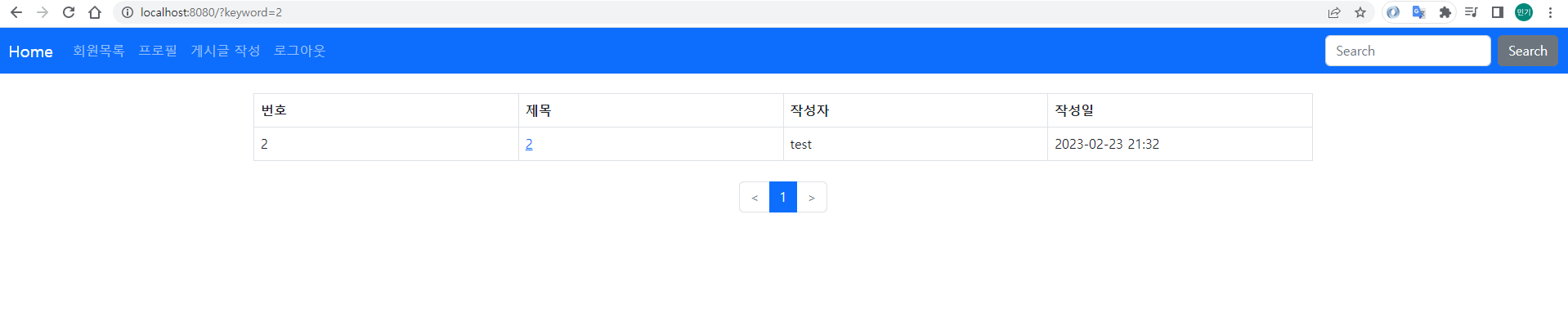
위와 같이 검색 내용을 제대로 가져오는 것을 확인할 수 있다.
🟧 View
⏹️ home.html
이전에 페이징 처리를 했을 당시 keyword를 고려하지 않았기 때문에 여러 개의 검색 결과가 나왔을 경우
페이징 처리를 할 수 없다.
그래서 keyword를 고려하여 수정해 준다.
<div th:if="${!boardList.isEmpty()}">
<ul class="pagination"
th:with="
pageNumber = ${boardList.pageable.pageNumber},
pageSize = ${boardList.pageable.pageSize},
totalPages = ${boardList.totalPages},
startPage = ${T(java.lang.Math).floor(pageNumber / pageSize) * pageSize + 1},
tempEndPage = ${startPage + pageSize - 1},
endPage = (${tempEndPage < totalPages ? tempEndPage : totalPages})">
<li th:classappend="${boardList.first} ? 'disabled'" class="page-item">
<a class="page-link" th:if="${param.keyword == null}" th:href="${boardList.first} ? '#' : @{/(page=${pageNumber - 1})}" aria-label="Previous">
<span aria-hidden="true"><</span>
</a>
<a class="page-link" th:if="${param.keyword != null}" th:href="${boardList.first} ? '#' : @{/(page=${pageNumber - 1}, keyword=${param.keyword})}" aria-label="Previous">
<span aria-hidden="true"><</span>
</a>
</li>
<li th:each="page: ${#numbers.sequence(startPage, endPage)}" th:classappend="${page == pageNumber + 1} ? 'active'" class="page-item">
<a th:text="${page}" th:if="${param.keyword == null}" class="page-link" th:href="@{/(page=${page - 1})}"></a>
<a th:text="${page}" th:if="${param.keyword != null}" class="page-link" th:href="@{/(page=${page - 1}, keyword=${param.keyword})}"></a>
</li>
<li th:classappend="${boardList.last} ? 'disabled'" class="page-item">
<a class="page-link" th:if="${param.keyword == null}" th:href="${boardList.last} ? '#' : @{/(page=${pageNumber + 1})}" aria-label="Next">
<span aria-hidden="true">></span>
</a>
<a class="page-link" th:if="${param.keyword != null}" th:href="${boardList.last} ? '#' : @{/(page=${pageNumber + 1}, keyword=${param.keyword})}" aria-label="Next">
<span aria-hidden="true">></span>
</a>
</li>
</ul>
</div>파라미터 중 keyword가 존재하는지 확인 후 분기처리를 진행하였다.
✅ 끝
귀차니즘이 극에 달한 몸을 이끌고 굳은 다짐과 함께 시작한 작업치고는 너무 쉬워서 재미가 없어졌다.
당분간은 자격증 공부에 몰두를..
다음은 댓글 기능을 구현해 볼 예정이다!
https://github.com/Kimmingki/board
GitHub - Kimmingki/board: 강의만 듣다 때려치우지 말고 조금씩이라도 개발해보자...!!
강의만 듣다 때려치우지 말고 조금씩이라도 개발해보자...!! Contribute to Kimmingki/board development by creating an account on GitHub.
github.com